FINUNITY · PRODUCT GUIDE
One clear ledger for scattered assets
Bring scattered accounts, cash, holdings and transactions into one ledger. Reconcile records and exchange rates before reviewing your three-bucket allocation.
One ledger, three organising tasks
Accounts and currencies
Opening cash plus transactions produces the cash balance; holdings add their market value. Review each currency first. Missing rates leave explicit unconverted amounts.
Read the currency guideImport after review
Use screenshot recognition or spreadsheet entry according to current service availability. Check instrument, currency, quantity and cost before confirming a write.
Read the import checklistThree-bucket allocation
Organise recorded assets as aggressive, balanced or defensive and compare them with your own target proportions. This supports record keeping and review, not product selection or trade execution.
A fictional ledger example
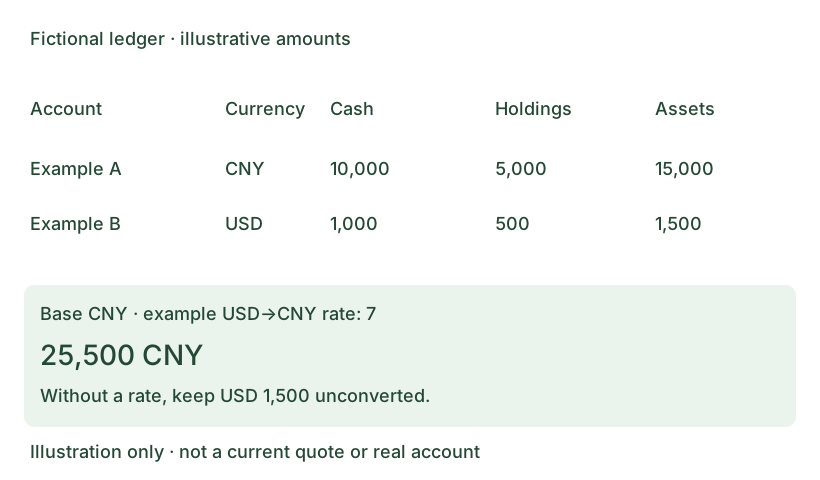
The CNY account has 15,000 and the USD account 1,500. Only when a fictional USD→CNY rate of 7 is entered does 15,000 + 1,500 × 7 equal CNY 25,500. Without a rate, retain separate currency totals.
Where data is processed
The Web client stores accounts, holdings, transactions and settings through the FinUnity server; it is not a fully offline ledger. A screenshot is sent only after you submit it, through the server to its configured recognition provider. FinUnity handles the original in request memory; structured recognition records are retained and holdings are written after confirmation. Provider processing and retention follow the privacy policy; third-party zero retention is not promised.
First use
- Read the privacy policy and terms, then register a username and password. New accounts do not require email.
- Save the recovery code shown once before entering the workspace. Never send passwords, recovery codes or complete financial screenshots to the maintainer.
- Start with one account and verify cash, currency and allocation settings, then review a small holding batch.
Prices and recognition outputs are reference data requiring review, not guaranteed real-time or error-free information. Availability depends on feature switches, quotas and provider readiness; a guide is not proof that recognition is enabled.